
If you have the feeling that the recommended date for the next spraying after a recent registered spraying in the field register does not adapt, check the following points:
Give the forecast time to calculate.
The programme has to process large amounts of data in order to calculate a new recommendation for you. However, it usually takes no longer than 30 seconds. However, if you have not yet made any adjustments, wait a moment longer. Occasionally it can take 60-90 seconds.
Reload page
Reload the page once completely. Sometimes data gets stuck in the cache and blocks the update.
Have you not entered the area that is connected to your virtual station in the documentation?
It can happen that a field was not included in the last documentation. As a result, the virtual station connected to the field cannot receive any information on the last crop protection measure and the agents used.
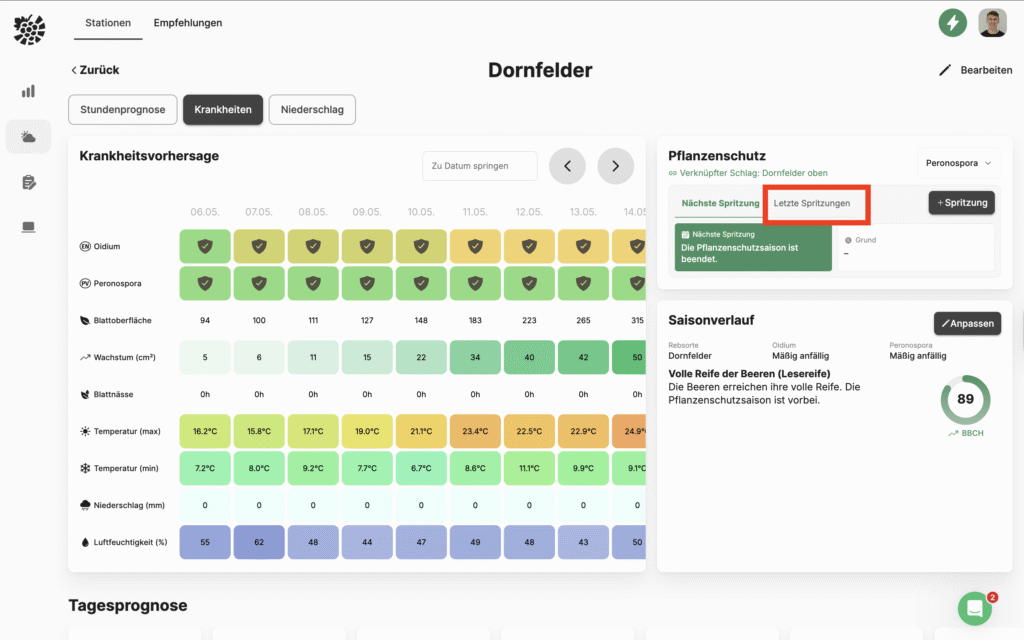
Select the station that displays a date that lies in the past under Forecasts -> Recommendations from. Then select the disease for which the recommended date is in the past from the dropdown in the "Plant protection" box on the right-hand side. Then click on the "Last sprayings" tab. Here you can now see which crop protection measures have been documented for the field linked to the station. If a spraying is missing here, you can simply select the field under Schlagkartei -> Plant protection to the corresponding plant protection measure. See the following article: Document plant protection
Have you stored a plant protection product against the relevant fungal disease?
Occasionally, you may accidentally select the wrong product from the list or make a mistake when selecting it. As described above, you can check whether you have stored an effective product in the detailed view of the station in the "Last sprays" tab in the Plant protection box.
If a product is missing here, you can simply add it under Schlagkartei -> Plant protection to the corresponding plant protection measure. See the following article: Document plant protection